

Remove archived assets
This feature is available in the job:
- Bynder x Shopify - Remove Shopify files (Shopify - Bynder Connector)
When assets are archived or deleted in Bynder, they should also be removed from Shopify.
To ensure this, a synchronization process can be set up.
This archiving or deletion must be reflected in the Shopify store. Otherwise, some products would display assets you no longer have rights to.
It compares the assets currently in Bynder with those in Shopify, and automatically removes from Shopify any assets that no longer exist or are archived in Bynder.
Configuration
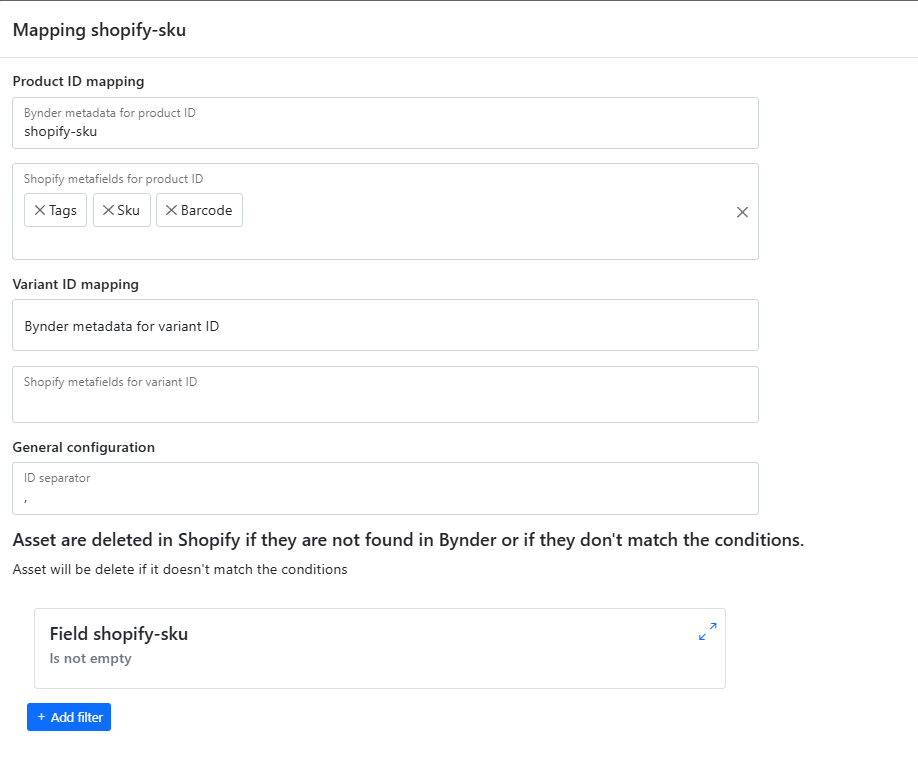
The following information is required:
- Product mapping:
- The Bynder meta property that contains the Product Identifier
- The fields in Shopify used to link to the products
- Variant mapping:
- The Bynder meta property that contains the Product Variant Identifier
- The fields in Shopify used to link to the Variant ID
- The ID separator (generally, it's the comma)
- The conditions an asset must meet to be kept in your store.
Configuring the conditions is simple: you define filters to specify which assets should be kept in Shopify. Any asset not matching these filters will be removed from Shopify. In most cases, you can reuse the filters you configured for the job that imports assets from Bynder to Shopify.
Explanation of the summary page
If we look at the following summary:
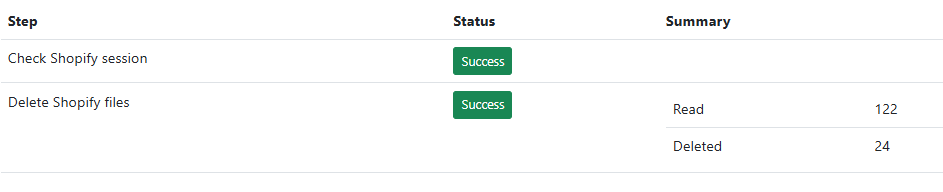
We see that:
- 122 assets were read
- 24 assets were deleted